
(Basic) Running Pre-Compiled ResNet50#
This tutorial demonstrates how to run a precompiled ResNet50 model on Mobilint NPUs using the provided runtime package.
It includes:
Examples for ARIES-based systems (MLA100 PCIe / MXM / MLX-A1)
Cross-compilation setup for REGULUS
Prerequisites#
Before starting, ensure the following components are installed on your system:
Mobilint NPU hardware:
ARIES (MLA100 PCIe / MLA100 MXM / MLX-A1), or
REGULUS SoC
Driver
Runtime Library
For ARIES-based form factors#
Ensure your driver and runtime environments are ready.
Download runtime library package file from Download Center.
Unzip the runtime library package and navigate to the ResNet50 directory:
cd {YOUR_DOWNLOAD_DIR}/qb_runtime_aries2-v4_v{MACCEL_VERSION_NUMBER}/maccel/resnet50
You should see the following files:
qb_runtime_aries2-v4_v{MACCEL_VERSION_NUMBER}/maccel/resnet50/
├── ILSVRC2012_val_00000001.JPEG  # Example image
├── resnet50.cc                   # C++ inference code
├── resnet50.mxq                  # Compiled Resnet50 model
├── resnet50.py                   # Python inference code
├── stb_image.h                   # library for image load
└── stb_image_resize.h            # library for image processing
Run example code
C++ code (
resnet50.cc)Compile the code following this document.
g++ -o resnet50 resnet50.cc -lmaccel
Execute compiled binary.
Python (
resnet50.py)Make sure runtime library python package
maccelis installed in your python library by referring to this document.Install
opencv-pythonpackage for image processing.pip install opencv-python
Run example code.
python resnet50.py
For REGULUS#
Note
REGULUS comes with driver and runtime library pre-installed, so no additional installation is required.
Programs running on REGULUS must be built in a cross-compilation environment so that they can execute on ARM CPU within REGULUS. After build, compiled program should be uploaded to REGULUS for execution.
Download
regulus-release_vX.X.X.tar.gzfile from Mobilint Download Center.Unzip the file, then run
install-regulus-toolchain.shscript and press Enter to install cross-compilation toolchain:$ cd regulus-release_vX.X.X $ ./install-regulus-toolchain.sh # ==> type "enter"
Note
Running the above command will create a directory at “/opt/crosstools/mobilint/Y.Y.Y/X.X.X”.
Activate cross-compilation environment with following command:
$ source /opt/crosstools/mobilint/X.X.X/<version>/environment-setup-cortexa53-mobilint-linux
Download ResNet50 package from demo github repository and build it:
$ git clone https://github.com/mobilint/regulus-npu-demo.git
$ cd regulus-npu-demo/image-classification-resnet50
$ make
Upload generated binary to REGULUS device and run it:
./resnet50
Epilogue: Understanding the NPU Application Structure#
Once you’ve confirmed the ResNet50 example runs successfully on your NPU, you can use this implementation as a starting point to develop your own AI applications.
The following diagram outlines the typical structure of an NPU application, highlighting which steps are handled by the runtime and which require custom development:
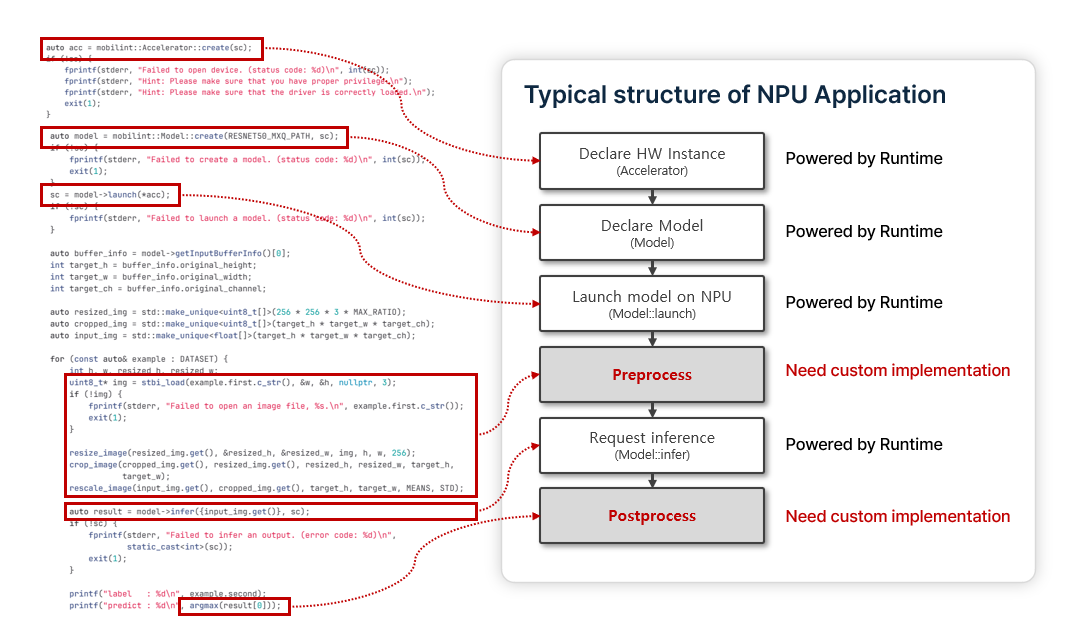
This ResNet50 example is a minimal demonstration. To bring your application closer to production, consider implementing advanced optimization techniques, such as multithreading and non-blocking I/O.
See also
The optimization techniques vary significantly depending on the application and its environment. For more guidance, see the Advanced Usage section.