
Advanced Usage#
This section covers some of the advanced features of the runtime library that allow developers to optimize performance and customize resource allocation on the NPU.
These features are not required for basic operation, but can significantly enhance throughput and flexibility in multi-stream, multi-model, or other various environments where fine-grained control or scalability is needed.
Tip
ARIES contains eight (8) independent NPU processing cores, and REGULUS has one (1) independent NPU core.
(Important) Multi-threading#
Note
The following instruction is applicable to ARIES-powered products only.
By default, inference using the runtime library (via mobilint::Model::infer() method) operates
in a blocking or synchronous I/O manner. This approach has been chosen as the
default because it is the simplest structurally and the easiest to understand when
working with an unfamiliar runtime library.
However, blocking I/O has the following limitation:
When inference is performed using a single thread, the CPU sends a task to NPU and waits for result each time. As a result, CPU cannot immediately sends next inputs, so multiple NPU cores(or clusters) cannot be utilized simultaneously. In other words, CPU must wait until core/cluster finishes its task before sending next input, which prevents taking advantage of multiple cores or clusters.
To address this issue, you can either:
Implement multi-threaded program directly, or
Use
inferAsync()method provided by Mobilint runtime.
For users familiar with multi-threaded programming, performance can be improved by implementing a custom multi-threaded program, as shown in simple example below.
void work(Model* model) {
    StatusCode sc;
    NDArray<float> input(model->getModelInputShape()[0], sc);
    std::vector<NDArray<float>> output;
    for (int i = 0; i < 10; i++) {
        sc = model->infer({input}, output);
    }
}

int main() {
    StatusCode sc;
    auto acc = Accelerator::create(sc);
    auto model = Model::create(MXQ_PATH, sc);
    model->launch(*acc);

    std::vector<std::thread> threads;
    for (int i = 0; i < NUM_THREAD; i++) {
        threads.emplace_back(work, model.get());
    }

    for (int i = 0; i < NUM_THREAD; i++) {
        threads[i].join();
    }

    return 0;
}
Alternatively, if implementing a multi-threaded program is challenging, you can use inferAsync() method provided by Mobilint runtime library, as show in example below.
Caution
The inferAsync() method currently has the following limitations:
RNN/LSTM/LLM models are not yet supported.
Models requiring CPU offloading are not yet supported.
Only single-batch inference supported.
For much details, please refer to API Reference under the Model class, section “Asynchronous Inference”.
## Python example
import maccel
from collections import deque

mc = maccel.ModelConfig()
mc.set_async_pipeline_enabled(True)

acc = maccel.Accelerator()

model = maccel.Model(MXQ_PATH, mc)
model.launch(acc)

## Method 1: Simple usage example
future_results = []
results = []

for i in range(NUM_INFERENCE):
    rand_input = np.random.rand(224, 224, 3).astype(np.float32)
    future_result = model.infer_async(rand_input)
    future_results.append(future_result)

for future in future_results:
    res = future.get()
    results.append(res)

## Method 2: Focus on real-time data processing
future_results = deque()
for i in range(NUM_INFERENCE):
    rand_input = np.random.rand(224, 224, 3).astype(np.float32)
    future_result = model.infer_async(rand_input)
    future_results.append(future_result)

    while future_results and (future_results[0].wait_for(0) or i == NUM_INFERENCE - 1):
        future = future_results.popleft()
        res = future.get()
        ## RESULT PROCESSING ...
// C++ example
#include "maccel/maccel.h"

#include <queue>
#include <vector>

int main() {
    mobilint::StatusCode sc;
    mobilint::ModelConfig mc;

    auto acc = mobilint::Accelerator::create(sc);
    if (!sc) exit(1);

    mc.setAsyncPipelineEnabled(true);

    auto model = mobilint::Model::create(MXQ_PATH, mc, sc);
    if (!sc) exit(1);

    sc = model->launch(*acc);
    if (!sc) exit(1);

    // Note: For simplicity, validating `sc` value are omitted below.
    // Method 1: Simple usage example
    std::vector<mobilint::Future<float>> future_results;
    std::vector<std::vector<mobilint::NDArray<float>>> results;

    for (int i = 0; i < NUM_INFERENCE; i++) {
        auto rnd_inputs = mobilint::NDArray<float>({224, 224, 3}, sc);
        mobilint::Future<float> future = model->inferAsync({rnd_inputs}, sc);
        future_results.push_back(std::move(future));
    }

    for (auto& future_result: future_results) {
        std::vector<mobilint::NDArray<float>> res = future_result.get(sc);
        results.push_back(std::move(res));
    }

    // Method 2: Focus on real-time data processing
    std::queue<mobilint::Future<float>> future_results;
    for (int i = 0; i < NUM_INFERENCE; i++) {
        auto rnd_inputs = mobilint::NDArray<float>({224, 224, 3}, sc);
        mobilint::Future<float> future = model->inferAsync({rnd_inputs}, sc);
        future_results.push(std::move(future));

        while (!future_results.empty() && (future_results.front().waitFor(0) ||
                                            i == NUM_INFERENCE - 1)) {
            auto future_result = std::move(future_results.front());
            future_results.pop();

            std::vector<mobilint::NDArray<float>> res = future_result.get(sc);
            // RESULT PROCESSING ...
        }
    }
}
ModelConfig Configuration#
Note
The following instruction is applicable to ARIES-powered products only.
ARIES consists of two (2) clusters each containing one (1) global core and four (4) local cores. The runtime library allows developers to control how many and which cores are used for a specific model through the ModelConfig structure.
This allows better resource partitioning, especially when running multiple models concurrently.
For example, When initializing a Model object, you can define which NPU cores to use and select the appropriate core mode through the ModelConfig object.
C++ Example#
#include "maccel/maccel.h"

using mobilint::Accelerator;
using mobilint::Cluster;
using mobilint::Core;
using mobilint::Model;
using mobilint::ModelConfig;
using mobilint::StatusCode;

int main() {
    const char* MXQ_PATH = "resnet50.mxq";

    StatusCode sc;
    auto acc = Accelerator::create(sc);

    ModelConfig mc1;
    mc1.setSingleCoreMode(2);
    auto model1 = Model::create(MXQ_PATH, mc1, sc);
    // model1->launch(*acc);  // Use 2 automatically assigned local cores in single-core mode.

    ModelConfig mc2;
    mc2.setSingleCoreMode(7);
    auto model2 = Model::create(MXQ_PATH, mc2, sc);
    // model2->launch(*acc);  // Use 7 automatically assigned local cores in single-core mode.

    ModelConfig mc3;
    mc3.setSingleCoreMode(
        {{Cluster::Cluster0, Core::Core0}, {Cluster::Cluster0, Core::Core1}});
    auto model3 = Model::create(MXQ_PATH, mc3, sc);
    // model3->launch(*acc);  // Use 2 manually specified local cores in single-core mode.

    ModelConfig mc4;
    mc4.setSingleCoreMode({{Cluster::Cluster0, Core::Core0},
                           {Cluster::Cluster0, Core::Core1},
                           {Cluster::Cluster0, Core::Core3},
                           {Cluster::Cluster1, Core::Core2},
                           {Cluster::Cluster1, Core::Core3}});
    auto model4 = Model::create(MXQ_PATH, mc4, sc);
    // model4->launch(*acc);  // Use 5 manually specified local cores in single-core mode.

    ModelConfig mc5;
    auto model5 = Model::create(MXQ_PATH, mc5, sc);
    // model5->launch(*acc); // Use all 8 local cores in single-core mode.

    ModelConfig mc6;
    mc6.setMultiCoreMode({Cluster::Cluster0});
    auto model6 = Model::create(MXQ_PATH, mc6, sc);
    // model6->launch(*acc); // Use 1 cluster (1 global core + 4 local cores) in multi-core mode.

    ModelConfig mc7;
    mc7.setMultiCoreMode({Cluster::Cluster0, Cluster::Cluster1});
    auto model7 = Model::create(MXQ_PATH, mc7, sc);
    // model7->launch(*acc); // Use 2 clusters (2 global cores + 8 local cores) in multi-core mode.

    ModelConfig mc8;
    mc8.setGlobal4CoreMode({Cluster::Cluster1});
    auto model8 = Model::create(MXQ_PATH, mc8, sc);
    // model8->launch(*acc); // Use 1 cluster (1 global core + 4 local cores) in global4-core mode.

    ModelConfig mc9;
    mc9.setGlobal4CoreMode({Cluster::Cluster0, Cluster::Cluster1});
    auto model9 = Model::create(MXQ_PATH, mc9, sc);
    // model9->launch(*acc); // Use 2 clusters (2 global cores + 8 local cores) in global4-core mode.

    ModelConfig mc10;
    mc10.setGlobal8CoreMode();
    auto model10 = Model::create(MXQ_PATH, mc10, sc);
    // model10->launch(*acc); // Use 2 clusters (2 global cores + 8 local cores) in global8-core mode.

    return 0;
}
Python Example#
from maccel import Accelerator, Model, ModelConfig, CoreId, Cluster, Core

MXQ_PATH = "resnet50.mxq"

acc = Accelerator()

mc1 = ModelConfig()
mc1.set_single_core_mode(num_cores=2)
model1 = Model(MXQ_PATH, mc1)
# model1.launch(acc)  # Use 2 automatically assigned local cores in single-core mode.

mc2 = ModelConfig()
mc2.set_single_core_mode(num_cores=7)
model2 = Model(MXQ_PATH, mc2)
# model2.launch(acc)  # Use 7 automatically assigned local cores in single-core mode.

mc3 = ModelConfig()
mc3.set_single_core_mode(
    core_ids=[
        CoreId(Cluster.Cluster0, Core.Core0),
        CoreId(Cluster.Cluster0, Core.Core1),
    ]
)
model3 = Model(MXQ_PATH, mc3)
# model3.launch(acc)  # Use 2 manually specified local cores in single-core mode.

mc4 = ModelConfig()
mc4.set_single_core_mode(
    core_ids=[
        CoreId(Cluster.Cluster0, Core.Core0),
        CoreId(Cluster.Cluster0, Core.Core1),
        CoreId(Cluster.Cluster0, Core.Core3),
        CoreId(Cluster.Cluster1, Core.Core2),
        CoreId(Cluster.Cluster1, Core.Core3),
    ]
)
model4 = Model(MXQ_PATH, mc4)
# model4.launch(acc)  # Use 5 manually specified local cores in single-core mode.

mc5 = ModelConfig()
model5 = Model(MXQ_PATH, mc5)
# model5.launch(acc)  # Use all 8 local cores in single-core mode.

mc6 = ModelConfig()
mc6.set_multi_core_mode([Cluster.Cluster0])
model6 = Model(MXQ_PATH, mc6)
# model6.launch(acc)  # Use 1 cluster (1 global core + 4 local cores) in multi-core mode.

mc7 = ModelConfig()
mc7.set_multi_core_mode([Cluster.Cluster0, Cluster.Cluster1])
model7 = Model(MXQ_PATH, mc7)
# model7.launch(acc)  # Use 2 clusters (2 global cores + 8 local cores) in multi-core mode.

mc8 = ModelConfig()
mc8.set_global4_core_mode([Cluster.Cluster1])
model8 = Model(MXQ_PATH, mc8)
# model8.launch(acc)  # Use 1 cluster (1 global core + 4 local cores) in global4-core mode.

mc9 = ModelConfig()
mc9.set_global4_core_mode([Cluster.Cluster0, Cluster.Cluster1])
model9 = Model(MXQ_PATH, mc9)
# model9.launch(acc)  # Use 2 clusters (2 global cores + 8 local cores) in global4-core mode.


mc10 = ModelConfig()
mc10.set_global8_core_mode()
model10 = Model(MXQ_PATH, mc10)
# model10.launch(acc)  # Use 2 clusters (2 global cores + 8 local cores) in global8-core mode.
Tracing NPU Usage#
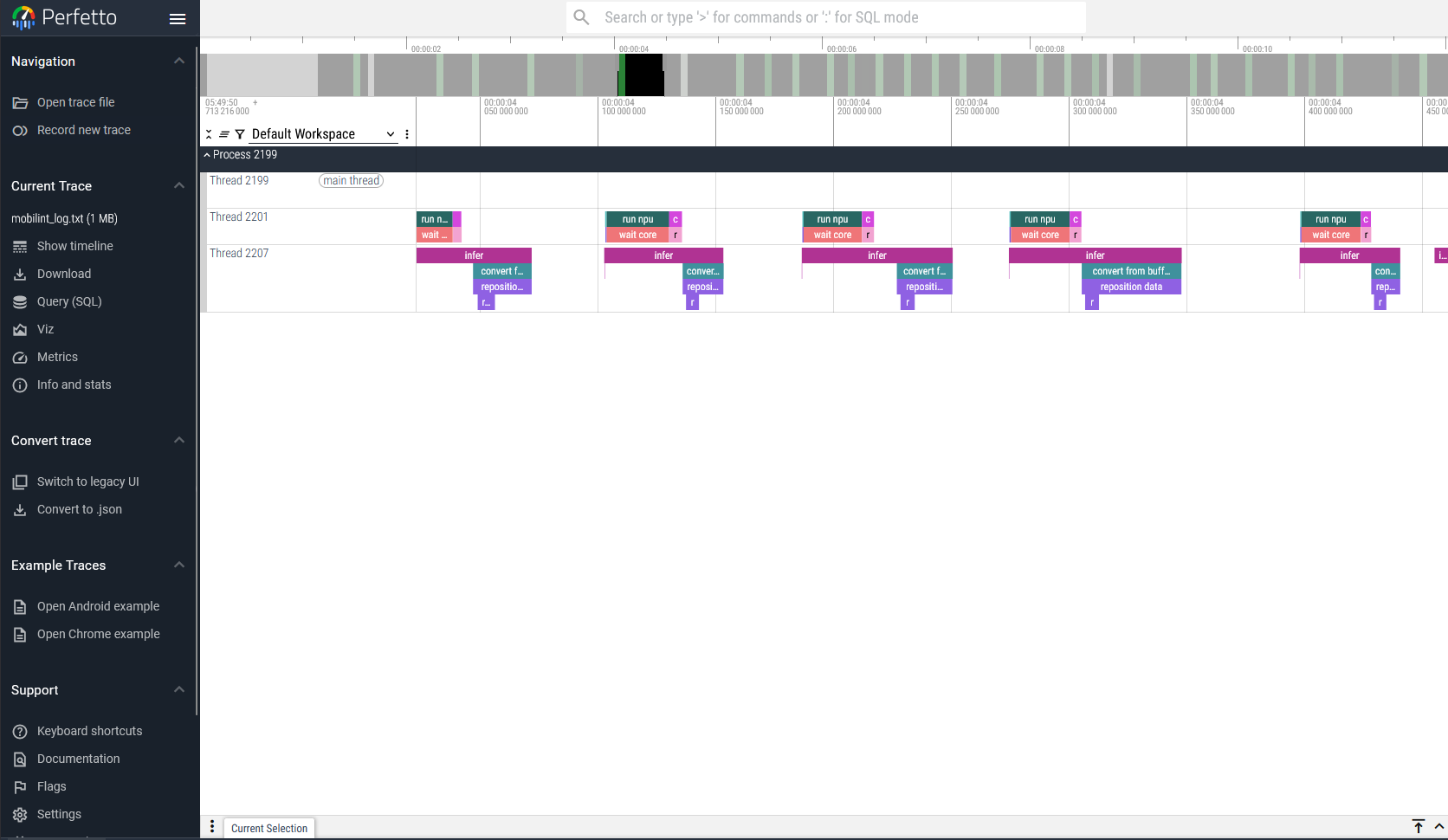
Runtime library offers a tracing feature. You can start tracing with startTracingEvents().
User can specify the trace log’s path in path argument. The log should result in a .json file format, which can be viewed in Perfetto UI. This trace log would be recorded until stopTracingEvents() is called.
You can enable tracing by using the following methods:
// c++ example
#include "maccel/maccel.h"
mobilint::startTracingEvents("path/to/trace.json");

// Tracing target NPU events

mobilint::stopTracingEvents();
## python example
import maccel
maccel.start_tracing_events("path/to/trace.json")

## Tracing target NPU events

maccel.stop_tracing_events()