
고급 기능#
본 문서는 NPU의 자원 할당을 제어하여 개발자가 직접 성능 최적화를 할 수 있게 하는 런타임 라이브러리의 고급 기능을 다룹니다.
이러한 기능들은 기본적인 활용에는 필수적이지 않지만, 멀티 스트림, 멀티 모델 등 정밀함과 확장성이 필요한 다양한 환경에서 확실히 처리량과 유연성을 향상시킬 수 있습니다.
팁
ARIES는 (8) 개의 독립적인 NPU 코어를 포함하고 있고, REGULUS는 (1) 개의 코어를 포함하고 있습니다.
(Important) 멀티 쓰레딩#
참고
아래의 설명은 ARIES 기반의 제품들에만 적용 가능합니다.
기본적으로, 런타임 라이브러리의 mobilint::Model::infer() 메서드를 통한 추론은 블로킹 또는 동기식 I/O 방식으로 작동합니다. 친숙하지 않은 라이브러리로 구현을 시작할 때 가장 간단하고 이해하기 쉬운 방식을 갖춰 개발자들에게 익숙해지는 것이 필요했기 때문입니다.
하지만, 이러한 블로킹 I/O 방식은 다음과 같은 한계점을 지니고 있습니다.
추론 시 단일 쓰레드를 이용하게 되면 CPU는 매번 NPU에게 작업을 보내고 결과가 나올 때까지 기다려야 합니다. 이렇게 되면 CPU가 다음 입력 작업을 바로 전달하지 못하므로, 여러 NPU코어(또는 클러스터)를 할당하더라도 동시에 활용되지 않습니다. 즉, 한 코어/클러스터의 작업이 끝나야 다음 입력을 CPU가 전달해줄 수 있어 복수개의 코어/클러스터 사용의 이점을 얻을 수 없습니다.
이 문제를 다루기 위해선
멀티 쓰레딩 프로그램을 직접 구현하거나
모빌린트 런타임에서 제공하는
inferAsync()메서드를 사용할 수 있습니다.
멀티 쓰레딩 구현이 익숙한 사용자는 아래의 간단한 예제 처럼 직접 멀티 쓰레딩 프로그램을 구현하여 성능을 향상시킬 수 있습니다.
void work(Model* model) {
    StatusCode sc;
    NDArray<float> input(model->getModelInputShape()[0], sc);
    std::vector<NDArray<float>> output;
    for (int i = 0; i < 10; i++) {
        sc = model->infer({input}, output);
    }
}

int main() {
    StatusCode sc;
    auto acc = Accelerator::create(sc);
    auto model = Model::create(MXQ_PATH, sc);
    model->launch(*acc);

    std::vector<std::thread> threads;
    for (int i = 0; i < NUM_THREAD; i++) {
        threads.emplace_back(work, model.get());
    }

    for (int i = 0; i < NUM_THREAD; i++) {
        threads[i].join();
    }

    return 0;
}
혹은 멀티 쓰레딩 프로그램의 구현에 어려움을 겪는 경우, 모빌린트 런타임 라이브러리에서 제공하는 inferAsync() 메서드를 아래 예시와 같이 사용할 수 있습니다.
조심
현재 inferAsync() 메서드는 아래와 같은 한계점을 가지고 있습니다.
RNN/LSTM/LLM 모델들은 아직 지원하지 않습니다.
CPU 오프로딩이 필요한 모델은 아직 지원하지 않습니다.
오직 단일 배치 추론만을 지원합니다.
자세한 사항은 API Reference의 class Model 페이지의 “Asynchronous Inference”
항목을 참조하세요.
## Python example
import maccel
from collections import deque

mc = maccel.ModelConfig()
mc.set_async_pipeline_enabled(True)

acc = maccel.Accelerator()

model = maccel.Model(MXQ_PATH, mc)
model.launch(acc)

## Method 1: Simple usage example
future_results = []
results = []

for i in range(NUM_INFERENCE):
    rand_input = np.random.rand(224, 224, 3).astype(np.float32)
    future_result = model.infer_async(rand_input)
    future_results.append(future_result)

for future in future_results:
    res = future.get()
    results.append(res)

## Method 2: Focus on real-time data processing
future_results = deque()
for i in range(NUM_INFERENCE):
    rand_input = np.random.rand(224, 224, 3).astype(np.float32)
    future_result = model.infer_async(rand_input)
    future_results.append(future_result)

    while future_results and (future_results[0].wait_for(0) or i == NUM_INFERENCE - 1):
        future = future_results.popleft()
        res = future.get()
        ## RESULT PROCESSING ...
// C++ example
#include "maccel/maccel.h"

#include <queue>
#include <vector>

int main() {
    mobilint::StatusCode sc;
    mobilint::ModelConfig mc;

    auto acc = mobilint::Accelerator::create(sc);
    if (!sc) exit(1);

    mc.setAsyncPipelineEnabled(true);

    auto model = mobilint::Model::create(MXQ_PATH, mc, sc);
    if (!sc) exit(1);

    sc = model->launch(*acc);
    if (!sc) exit(1);

    // Note: For simplicity, validating `sc` value are omitted below.
    // Method 1: Simple usage example
    std::vector<mobilint::Future<float>> future_results;
    std::vector<std::vector<mobilint::NDArray<float>>> results;

    for (int i = 0; i < NUM_INFERENCE; i++) {
        auto rnd_inputs = mobilint::NDArray<float>({224, 224, 3}, sc);
        mobilint::Future<float> future = model->inferAsync({rnd_inputs}, sc);
        future_results.push_back(std::move(future));
    }

    for (auto& future_result: future_results) {
        std::vector<mobilint::NDArray<float>> res = future_result.get(sc);
        results.push_back(std::move(res));
    }

    // Method 2: Focus on real-time data processing
    std::queue<mobilint::Future<float>> future_results;
    for (int i = 0; i < NUM_INFERENCE; i++) {
        auto rnd_inputs = mobilint::NDArray<float>({224, 224, 3}, sc);
        mobilint::Future<float> future = model->inferAsync({rnd_inputs}, sc);
        future_results.push(std::move(future));

        while (!future_results.empty() && (future_results.front().waitFor(0) ||
                                            i == NUM_INFERENCE - 1)) {
            auto future_result = std::move(future_results.front());
            future_results.pop();

            std::vector<mobilint::NDArray<float>> res = future_result.get(sc);
            // RESULT PROCESSING ...
        }
    }
}
ModelConfig 구성#
참고
아래의 설명은 ARIES 기반의 제품들에만 적용 가능합니다.
ARIES는 (2) 개의 클러스터로 구성되어 있고, 각 클러스터는 (4) 개의 코어와 (1) 개의 글로벌 코어를 포함합니다. 런타임 라이브러리는 개발자가 ModelConfig 구성을 통해 사용할 코어의 갯수와 어떤 코어를 사용할 지 조작할 수 있도록 도와줍니다.
이는 특히 여러 모델을 동시에 사용할 때 자원 분배에 이점을 가져다 줍니다.
예를 들어, ARIES NPU를 사용할 때에 Model 객체 생성 시에 어느 NPU 코어를 어떤 코어 모드로 작동시킬 지 ModelConfig 객체를 통해 전달할 수 있습니다.
C++ 예제#
#include "maccel/maccel.h"

using mobilint::Accelerator;
using mobilint::Cluster;
using mobilint::Core;
using mobilint::Model;
using mobilint::ModelConfig;
using mobilint::StatusCode;

int main() {
    const char* MXQ_PATH = "resnet50.mxq";

    StatusCode sc;
    auto acc = Accelerator::create(sc);

    ModelConfig mc1;
    mc1.setSingleCoreMode(2);
    auto model1 = Model::create(MXQ_PATH, mc1, sc);
    // model1->launch(*acc);  // Use 2 automatically assigned local cores in single-core mode.

    ModelConfig mc2;
    mc2.setSingleCoreMode(7);
    auto model2 = Model::create(MXQ_PATH, mc2, sc);
    // model2->launch(*acc);  // Use 7 automatically assigned local cores in single-core mode.

    ModelConfig mc3;
    mc3.setSingleCoreMode(
        {{Cluster::Cluster0, Core::Core0}, {Cluster::Cluster0, Core::Core1}});
    auto model3 = Model::create(MXQ_PATH, mc3, sc);
    // model3->launch(*acc);  // Use 2 manually specified local cores in single-core mode.

    ModelConfig mc4;
    mc4.setSingleCoreMode({{Cluster::Cluster0, Core::Core0},
                           {Cluster::Cluster0, Core::Core1},
                           {Cluster::Cluster0, Core::Core3},
                           {Cluster::Cluster1, Core::Core2},
                           {Cluster::Cluster1, Core::Core3}});
    auto model4 = Model::create(MXQ_PATH, mc4, sc);
    // model4->launch(*acc);  // Use 5 manually specified local cores in single-core mode.

    ModelConfig mc5;
    auto model5 = Model::create(MXQ_PATH, mc5, sc);
    // model5->launch(*acc); // Use all 8 local cores in single-core mode.

    ModelConfig mc6;
    mc6.setMultiCoreMode({Cluster::Cluster0});
    auto model6 = Model::create(MXQ_PATH, mc6, sc);
    // model6->launch(*acc); // Use 1 cluster (1 global core + 4 local cores) in multi-core mode.

    ModelConfig mc7;
    mc7.setMultiCoreMode({Cluster::Cluster0, Cluster::Cluster1});
    auto model7 = Model::create(MXQ_PATH, mc7, sc);
    // model7->launch(*acc); // Use 2 clusters (2 global cores + 8 local cores) in multi-core mode.

    ModelConfig mc8;
    mc8.setGlobal4CoreMode({Cluster::Cluster1});
    auto model8 = Model::create(MXQ_PATH, mc8, sc);
    // model8->launch(*acc); // Use 1 cluster (1 global core + 4 local cores) in global4-core mode.

    ModelConfig mc9;
    mc9.setGlobal4CoreMode({Cluster::Cluster0, Cluster::Cluster1});
    auto model9 = Model::create(MXQ_PATH, mc9, sc);
    // model9->launch(*acc); // Use 2 clusters (2 global cores + 8 local cores) in global4-core mode.

    ModelConfig mc10;
    mc10.setGlobal8CoreMode();
    auto model10 = Model::create(MXQ_PATH, mc10, sc);
    // model10->launch(*acc); // Use 2 clusters (2 global cores + 8 local cores) in global8-core mode.

    return 0;
}
Python 예제#
from maccel import Accelerator, Model, ModelConfig, CoreId, Cluster, Core

MXQ_PATH = "resnet50.mxq"

acc = Accelerator()

mc1 = ModelConfig()
mc1.set_single_core_mode(num_cores=2)
model1 = Model(MXQ_PATH, mc1)
# model1.launch(acc)  # Use 2 automatically assigned local cores in single-core mode.

mc2 = ModelConfig()
mc2.set_single_core_mode(num_cores=7)
model2 = Model(MXQ_PATH, mc2)
# model2.launch(acc)  # Use 7 automatically assigned local cores in single-core mode.

mc3 = ModelConfig()
mc3.set_single_core_mode(
    core_ids=[
        CoreId(Cluster.Cluster0, Core.Core0),
        CoreId(Cluster.Cluster0, Core.Core1),
    ]
)
model3 = Model(MXQ_PATH, mc3)
# model3.launch(acc)  # Use 2 manually specified local cores in single-core mode.

mc4 = ModelConfig()
mc4.set_single_core_mode(
    core_ids=[
        CoreId(Cluster.Cluster0, Core.Core0),
        CoreId(Cluster.Cluster0, Core.Core1),
        CoreId(Cluster.Cluster0, Core.Core3),
        CoreId(Cluster.Cluster1, Core.Core2),
        CoreId(Cluster.Cluster1, Core.Core3),
    ]
)
model4 = Model(MXQ_PATH, mc4)
# model4.launch(acc)  # Use 5 manually specified local cores in single-core mode.

mc5 = ModelConfig()
model5 = Model(MXQ_PATH, mc5)
# model5.launch(acc)  # Use all 8 local cores in single-core mode.

mc6 = ModelConfig()
mc6.set_multi_core_mode([Cluster.Cluster0])
model6 = Model(MXQ_PATH, mc6)
# model6.launch(acc)  # Use 1 cluster (1 global core + 4 local cores) in multi-core mode.

mc7 = ModelConfig()
mc7.set_multi_core_mode([Cluster.Cluster0, Cluster.Cluster1])
model7 = Model(MXQ_PATH, mc7)
# model7.launch(acc)  # Use 2 clusters (2 global cores + 8 local cores) in multi-core mode.

mc8 = ModelConfig()
mc8.set_global4_core_mode([Cluster.Cluster1])
model8 = Model(MXQ_PATH, mc8)
# model8.launch(acc)  # Use 1 cluster (1 global core + 4 local cores) in global4-core mode.

mc9 = ModelConfig()
mc9.set_global4_core_mode([Cluster.Cluster0, Cluster.Cluster1])
model9 = Model(MXQ_PATH, mc9)
# model9.launch(acc)  # Use 2 clusters (2 global cores + 8 local cores) in global4-core mode.


mc10 = ModelConfig()
mc10.set_global8_core_mode()
model10 = Model(MXQ_PATH, mc10)
# model10.launch(acc)  # Use 2 clusters (2 global cores + 8 local cores) in global8-core mode.
NPU 사용량 추적 (Tracing)#
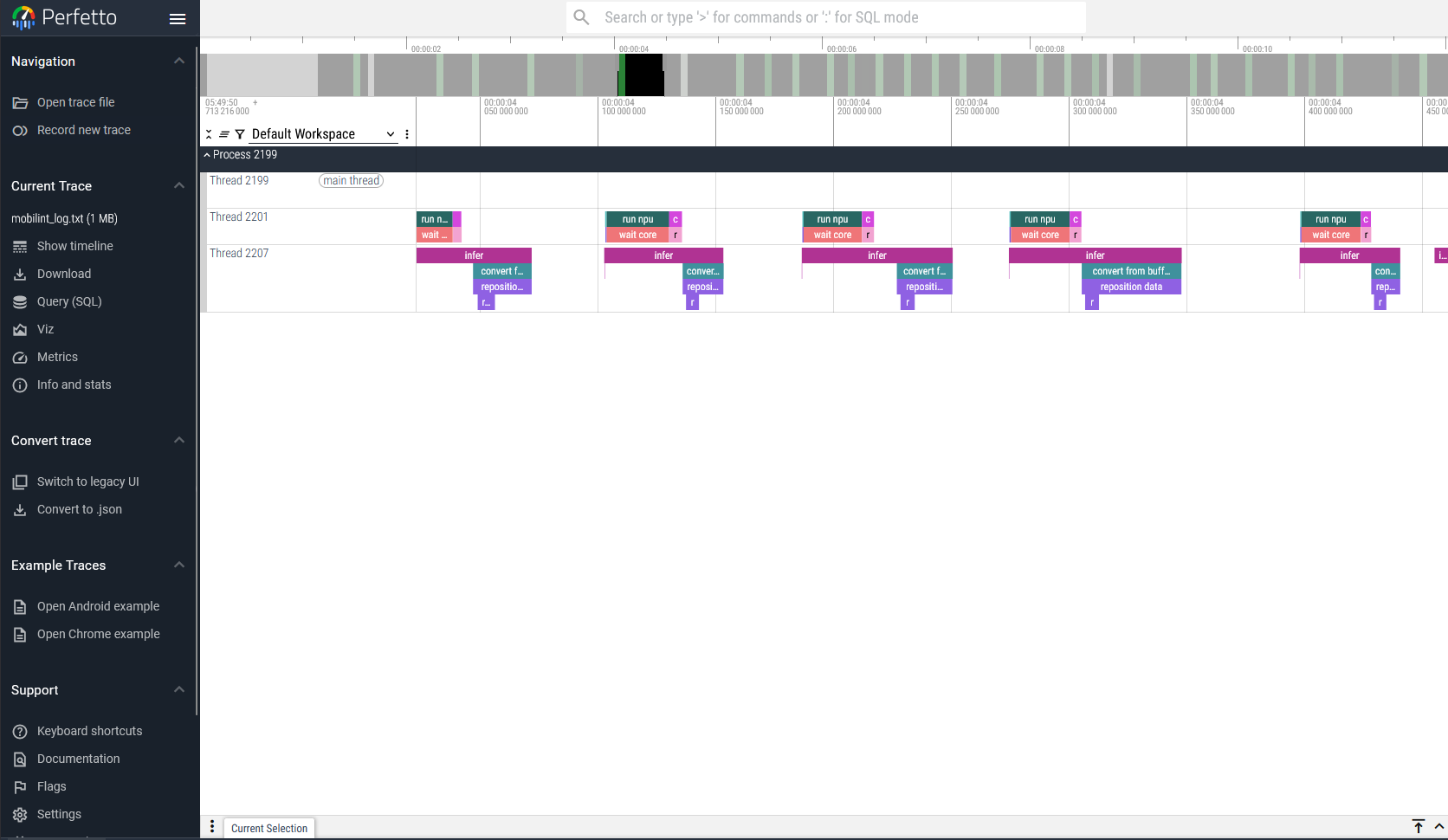
런타임 라이브러리는 사용량 추적(트레이싱) 기능을 제공합니다. 트레이싱은 startTracingEvents() 함수를 호출하여 시작할 수 있습니다.
사용자는 path 인자에 트레이스 로그의 저장 경로를 지정할 수 있습니다. 이 트레이스 로그는 .json 형식으로 저장되며, Perfetto UI 등의 웹에서 시각화할 수 있습니다.
이 트레이스 로그는 stopTracingEvents() 함수가 호출될 때까지 기록됩니다. 다음과 같은 방법으로 트레이싱 기능을 활성화할 수 있습니다.
// c++ 예제
#include "maccel/maccel.h"
mobilint::startTracingEvents("path/to/trace.json");

// 사용량을 측정하고 싶은 NPU 기능들

mobilint::stopTracingEvents();
## python 예제
import maccel
maccel.start_tracing_events("path/to/trace.json")

## 사용량을 측정하고 싶은 NPU 기능들

maccel.stop_tracing_events()