유틸리티 사용
본 문서는 모빌린트 NPU의 상태 확인 혹은 기타 테스트 등에 사용할 수 있는 유틸리티 기능에 대한 설명을 제공합니다.
Linux 전용 유틸리티
- mobilint-runtime-gui: NPU를 이용해 다양한 AI 모델을 코드 없이 쉽게 실행·테스트할 수 있는 GUI 기반 유틸리티.
mobilint-runtime-gui
-
GUI 서버 실행
터미널에 다음 명령을 입력하여 GUI 서버를 실행합니다.
정상적으로 실행되면, 아래 사진과 같이 붉은 박스 영역에 접속 주소가 표시됩니다 (예: "http://127.0.0.1:5000")

-
웹 브라우저로 접속
안내 메세지에 표시된 주소(예: "http://127.0.0.1:5000")를 복사한 뒤, 웹 브라우저의 주소창에 입력하여 접속합니다.
-
GUI 사용
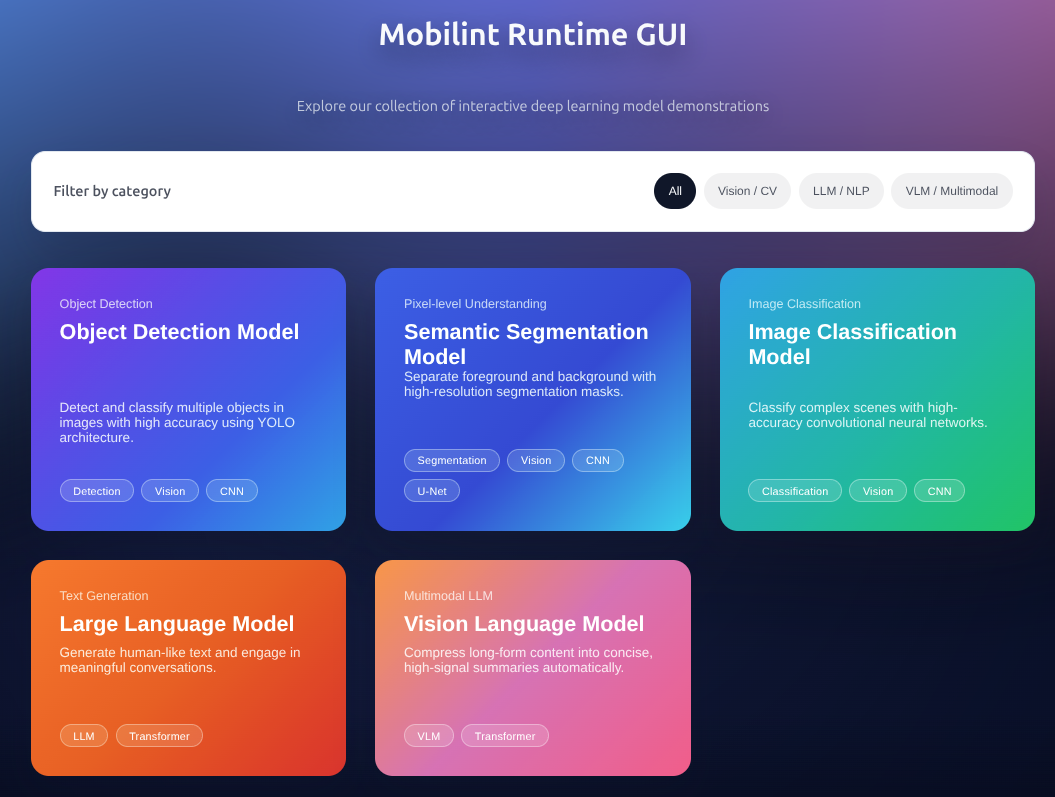
브라우저 접속이 성공하면 아래 사진과 같은 GUI 화면이 표시됩니다.
-
사용 종료
GUI를 종료하려면 실행한 터미널에 "Ctrl + C" 를 입력하여 GUI 서버를 종료합니다.
Windows, Linux 공용 유틸리티
- mobilint-cli: NPU 상태 확인, 벤치마크 실행, MXQ 정보 조회 등을 수행할 수 있는 커맨드라인 유틸리티.
- mobilint_ctrl: NPU 상태를 확인하고 firmware를 업데이트할 수 있는 GUI 유틸리티.
- aries_flash_firmware: NPU firmware를 업데이트할 수 있는 CLI 유틸리티.
mobilint-cli
-
NPU 상태 확인
-L또는--list-npus: 시스템에 설치된 모든 NPU 디바이스를 표시합니다.-i {device_id}또는--id {device_id}: 지정한{device_id}에 해당하는 NPU 디바이스의 상태를 표시합니다.{device_id}는 Linux의 "/dev/aries*"에서 숫자 부분에 해당합니다.-l {second}또는--loop {second}:{second}초 간격으로 디바이스의 상태를 지속적으로 표시합니다.-i또는--id옵션이 없으면 기본 디바이스(0번)의 상태를 표시합니다.-m {milli_sec}또는--loop-ms {milli-sec}:-l옵션과 동일하나, 밀리초 단위로 상태를 갱신합니다.-f {file_name}또는--file {file_name}: 디바이스 상태를{file_name}파일로 저장합니다.-q또는--query: NPU 정보를 표시합니다.-s {항목}또는--select {항목}: 표시할 정보를 선택합니다.PRODUCT,FIRMWARE,TEMPERATURE,POWER,MEMORY,UTILIZATION등을 쉼표로 구분해 조합할 수 있으며,-q옵션과 함께 사용합니다.
-
NPU 상태 연속 모니터링
NPU 상태와 리소스 사용량을 화면에서 계속 갱신하여 표시합니다.
-
사용 가능한 NPU 목록 확인
mobilint-cli status -L과 동일합니다. -
MXQ 파일 정보 확인
show [--verbose] {mxq_path}:{mxq_path}경로의 MXQ 파일 정보를 출력합니다.--verbose를 지정하면 상세 정보를 출력합니다.extract {mxq_path} {dir_path}:{mxq_file}경로에 있는 MXQ 파일의 내용을 추출하여{dir_path}폴더에 저장합니다.collect {dir_path} {mxq_path}:extract명령으로 추출한{dir_path}의 내용을 기반으로{mxq_path}에 새로운 MXQ 파일을 생성합니다.export-loc {mxq_path} {dir_path}:{mxq_path}의 loc 파일을{dir_path}폴더로 내보냅니다.
-
모델 요약 확인
{mxq_path}경로의 MXQ 파일에 담긴 모델의 요약 정보를 출력합니다. -
추론 테스트
--repeat-count {num}: 추론을{num}회 반복 수행합니다.--core-mode {mode}: 추론 시 사용할 코어 모드를 지정합니다. (컴파일 시 지정한 모드 내에서 사용해야 합니다.)--mxq-path {mxq_path}:{mxq_path}위치의 MXQ 모델을 사용하여 추론을 수행합니다.--summary:--mxq-path옵션으로 지정된 mxq 파일의 정보를 출력합니다.- 더 많은 옵션은
--help명령을 통해 확인할 수 있습니다.
-
벤치마크 테스트
Note
현재
mobilint-cli benchmark명령은 비전 모델만 지원합니다.-p {mxq_path}또는--mxq-path {mxq_path}:{mxq_path}위치의 MXQ 파일을 사용합니다.-t {second}또는--time {second}:{second}초 동안 벤치마크 테스트를 수행합니다.- 더 많은 옵션은
--help명령을 통해 확인할 수 있습니다.
-
버전 확인
Mobilint Ctrl
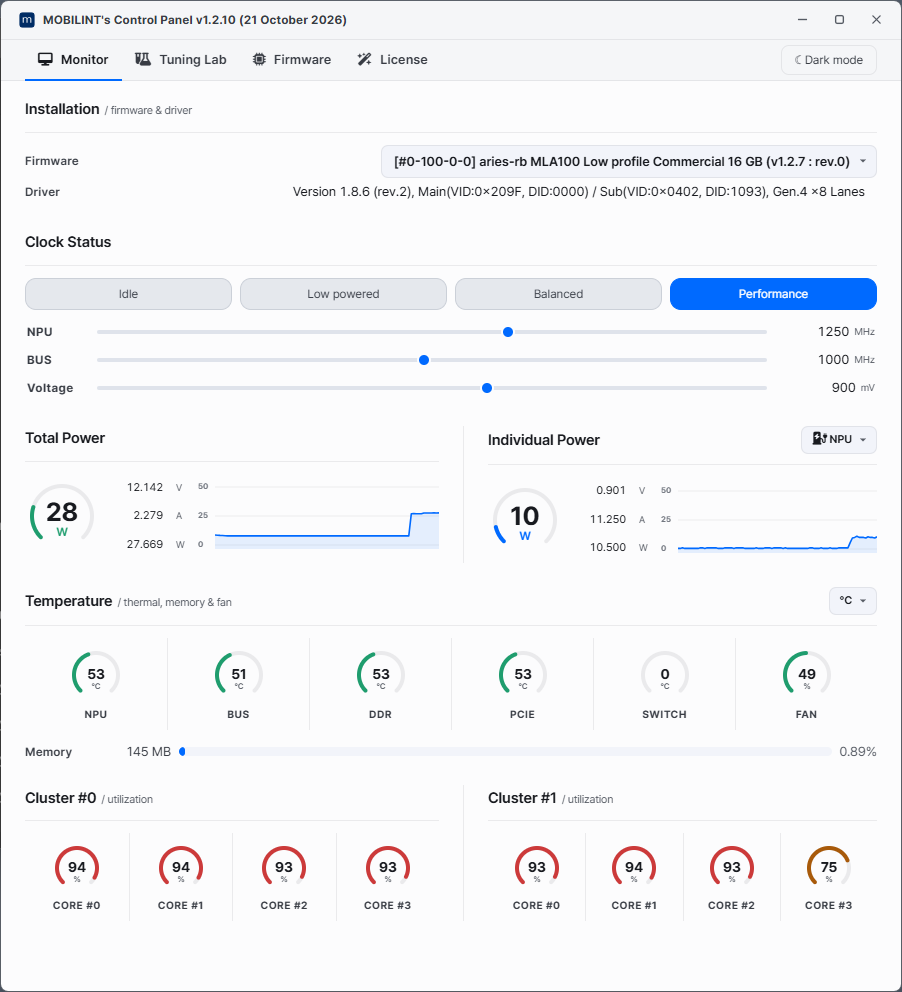
실행 시 위의 화면과 같이 NPU의 다양한 상태 정보 등을 표기해줍니다.
aries_flash_firmware
- aries_flash_firmware 유틸리티의 사용 가능 명령어 목록은 아래와 같습니다.
> aries_flash_firmware

Flash firmware for Aries. v0.5 (build #348 date : 31 December 2025)
Usage: aries_flash_firmware  [--help] [-f|--force] [-s|--supress_info] [-i|--id=device_id] [-t input_value] firmware_file

      --help                display this help and exit
  -f, --force               Force to flash without validation check.
  -s, --supress_info        Suppressed information.
  -i, --id=device_id        Device ID. (default : 0)
  -t input_value            Extra input value for special command.
  firmware_file             Input firmware file name(.gpt) or command.

                            ** Special command ** ([] <= with 'input_value')
                            status     : Get current device status [to file]
                            info       : Get firmware information [from file]
                            device     : List up all devices
                            list       : List up all firmware release
                            download   : Download latest/[Specific] firmware
                            update     : Update latest/[Specific] firmware
                            product    : Show product management information
-
설치된 카드 상태 확인하기
aries_flash_firmware status [-i device_id]명령어를 통해 카드의 상태를 확인할 수 있습니다.> aries_flash_firmware status * PCIe Device Driver connection details. > Driver version : 1.6.229 (Revision 0) > PCIe card connection information. - Main-System(VID:0x209F,DID:0x0000), Sub-System(VID:0x0402,DID:0x1093), PCIe 4.0 - 8 Lanes Device type : Aries 2 (Firmware rev. 0) Product type : Commercial Board type : Low profile DRAM size : 16 GB *I: Current firmware. - Reading Board [==================================================] Done. BSP : aries-mla100-32Gb Product name : MLA100 LowProfile 16GB Version : v1.2.2 rev.0 (Build date : 2025-08-12 17:01:48 KST) Configuration : master(26c3edab) release SHA256 check : Ok! *I: The firmware is already up to date. -
모든 디바이스 정보 얻기
-
온라인 펌웨어 업데이트
Note
펌웨어 업데이트 이후에 펌웨어를 정상적으로 사용하기 위해 Host PC를 재부팅 해야합니다.
>aries_flash_firmware update
* PCIe Device Driver connection details.
        > Driver version : 1.8.0 (Revision 2)
        > PCIe card connection information.
                 - Main-System(VID:0x209F,DID:0x0000), Sub-System(VID:0x0402,DID:0x1093), PCIe 4.0 - 8 Lanes
        Device type   : Aries 2 (Firmware v1.2.4 rev#0)
        Product type  : Commercial
        Board type    : Low profile
        DRAM size     : 16 GB

*I: Current firmware.
    - Reading Board [==================================================] Done.
        BSP           : aries-mla100
        Product name  : MLA100 LowProfile
        Version       : v1.2.4 rev.0 (Build date : 2026-02-03 14:06:23 KST)
        Configuration : HEAD(10944bc7) release
        SHA256 check  : Ok!

*I: No need to update, The firmware is already up to date.
- More detail information : https://docs.mobilint.com